Most FE and PE exam prep focuses on content — which formulas to memorize, which handbook sections to tab, which topics carry the most questions. That is the right place to spend most of your time. But there is a format layer on top of the content that trips up candidates who have only ever practiced standard multiple-choice questions.
NCEES calls these alternate item types (AITs). They show up on both FE and PE computer-based exams alongside traditional A/B/C/D multiple-choice. If you have never seen one before exam day, the format itself can cost you time and confidence even when you know the underlying material.
This guide covers what each alternate item type looks like, where it tends to appear, and what you can do specifically to practice it.
NCEES describes alternate item types in the Examinee Guide available at ncees.org. The descriptions of each item type below are based on that official documentation. The Examinee Guide is updated periodically — always download the current version before your exam.
The Four NCEES Alternate Item Types
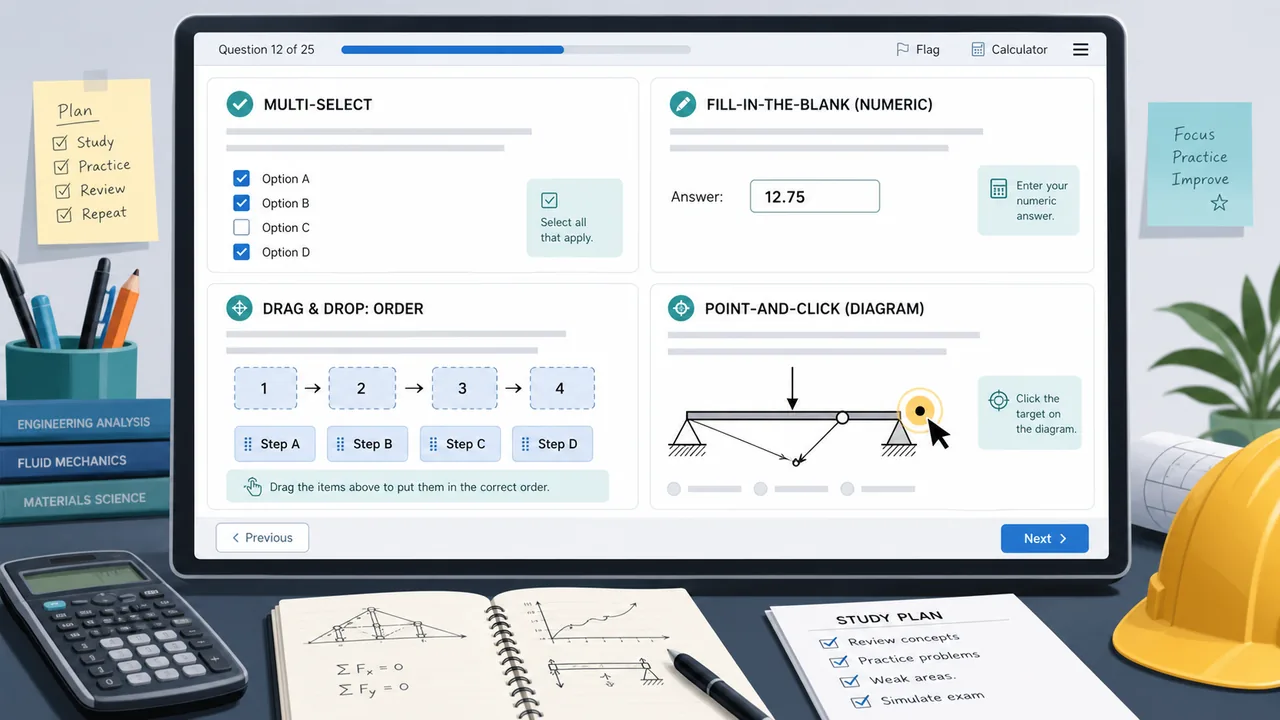
NCEES uses four question formats beyond standard multiple choice on its CBT exams:
- Multi-select (select all that apply)
- Fill-in-the-blank (type a numeric answer)
- Point-and-click / hotspot (click a location in an image)
- Drag-and-drop (sequence, match, or label items)
Standard multiple-choice — pick one answer from four options — remains the most common format on every FE and PE exam. Alternate item types supplement it and are graded the same way: you either get the question right or you do not. There is no partial credit.
Multi-Select (Select All That Apply)
Multi-select is the most commonly encountered alternate item type. It looks like a regular multiple-choice question but has more options (typically five to eight) and explicit instructions to select all correct answers.
What makes it different from standard multiple choice
With standard multiple choice, you can often narrow four options down to two and make an educated guess between them. Multi-select does not work that way. You must identify the complete correct set — all the right answers and none of the wrong ones. A single incorrect selection or a missing correct selection counts the whole question as wrong.
This format tests whether you understand a concept broadly enough to recognize every valid instance of it, not just the most obvious one.
Example scenario
A multi-select question might present a circuit and ask: Which of the following operating conditions would reduce total power dissipation? Select all that apply. You then see six statements about voltage, resistance, current, and topology changes — and two or three of them are correct. Picking only the most obvious one and missing a second correct answer is enough to score zero.
How to practice
- When reviewing any topic, actively ask: “What are all the conditions under which this is true?” rather than just the most common one.
- When you miss a multi-select question in practice, determine whether you missed a correct answer you did not consider or whether you included a wrong answer you misidentified as correct — these are different knowledge gaps.
- Treat each option as an independent true/false judgment. Do not let confidence in one option make you sloppy about others.
Fill-in-the-Blank (Numeric Entry)
Fill-in-the-blank questions ask you to compute a numerical answer and type it directly into a box. There are no answer choices to select from, no options to eliminate, and no way to back-solve from a provided result.
What makes it different
Standard multiple choice lets you verify an answer by plugging the options back into the problem. Fill-in-the-blank removes that option entirely. You must set up the problem correctly, execute it on your calculator, and trust your result.
Rounding is worth paying attention to. NCEES typically states an acceptable range or specifies the number of significant figures or decimal places expected. Reading the question carefully for “to the nearest tenth” or “in units of kPa” matters as much as the calculation itself.
How to practice
- Work calculation problems to completion without peeking at the answer options first. If you always verify by checking which given option matches your work, you are not building the skill fill-in-the-blank demands.
- Practice unit tracking explicitly. A numeric answer in the wrong units is wrong.
- Know your approved calculator well enough that you can execute multi-step calculations without losing intermediate results. The TI-36X Pro’s memory registers (STO/RCL) and the ANS key are particularly useful for fill-in-the-blank chains.
Point-and-Click / Hotspot
Hotspot questions display an image, diagram, chart, or schematic and ask you to click a specific location as your answer. Instead of selecting a letter, you click directly on the correct element in the graphic.
What makes it different
Hotspot questions test whether you can identify something visually, not just name it verbally. You might be shown a Mohr’s circle and asked to click the point representing maximum shear stress, or a phase diagram and asked to click the region corresponding to a specific mixture state, or a network diagram and asked to click the node that creates a bottleneck.
The challenge is spatial: you have to map your conceptual knowledge onto a specific location in a drawn image. Knowing the concept is necessary but not sufficient — you also have to recognize it in a graphical representation.
How to practice
- When studying any concept that has a graphical representation — stress-strain curves, phase diagrams, load diagrams, circuit schematics, hydraulic grade lines, signal flow graphs — practice identifying specific features by pointing to them rather than just naming them.
- Use the FE Reference Handbook figures actively. When you encounter a handbook diagram, quiz yourself: “If I had to click the yield point on this curve, where exactly would I click?”
- Sketch diagrams from memory when reviewing a topic, then compare your sketch to the handbook figure to check spatial accuracy.
Drag-and-Drop
Drag-and-drop questions ask you to move labeled items into correct positions. The three most common patterns are:
- Sequence / ordering: Place steps, stages, or events in the correct order (e.g., order the phases of a treatment process, arrange load path components from source to foundation).
- Matching: Match items from one column to items in another (e.g., match engineering properties to their SI units, match failure modes to their causes).
- Labeling: Drag labels onto the correct parts of a diagram (e.g., label the components of a truss, identify zones on a psychrometric chart).
What makes it different
Drag-and-drop questions require you to be right about everything simultaneously. If you are sequencing five steps and you have four correct but swap two, the entire question is wrong. They also surface gaps in knowledge that multiple choice can hide: you cannot guess that A is wrong and pick B if the question requires you to produce the correct answer positively.
How to practice
- For sequence-type topics — water treatment stages, construction sequences, load path order — practice writing the full correct sequence from memory rather than just recognizing it when listed.
- For matching, make sure you can distinguish similar-sounding terms clearly (e.g., consolidation vs. compaction, primary vs. secondary treatment, active vs. passive pressure).
- For labeling, practice with handbook diagrams: cover the labels, draw arrows to parts, then reveal and check.
How Alternate Item Types Are Scored
NCEES scores alternate item types the same as standard multiple choice: correct or incorrect, with no partial credit. A question you get partially right is scored the same as one you get entirely wrong.
This makes multi-select the riskiest alternate type for guessing, because you need the complete correct set. It also means there is no strategy benefit to leaving alternate-type questions blank rather than attempting them — there is no penalty for a wrong answer beyond losing that question’s credit.
How Common Are Alternate Item Types on the FE Exam?
NCEES does not publish a fixed per-discipline breakdown of how many alternate item type questions appear in a given exam session. The mix can vary. What is clear from the NCEES Examinee Guide is that all four alternate item types are part of the FE CBT format, and candidates should expect to see them.
Preparing for alternate item types does not require abandoning your content study plan. It means adjusting how you practice the same content: cover answers before checking them, write out sequences from memory, quiz yourself on diagrams spatially, and practice selecting all correct conditions rather than just one.
| Item Type | What You Do | Main Challenge | Key Practice Habit |
|---|---|---|---|
| Standard MC | Pick one answer from A–D | Distractor design | Eliminate before selecting; verify units |
| Multi-select | Select all correct answers from 5–8 options | Must get the complete correct set | Treat each option as independent true/false |
| Fill-in-the-blank | Type a numeric answer | No options to eliminate or verify against | Solve to completion without peeking; track units |
| Point-and-click | Click the correct location in an image | Spatial recognition of graphical concepts | Quiz yourself on diagram features by pointing |
| Drag-and-drop | Sequence, match, or label items | Must be fully correct; no partial credit | Write sequences from memory; label diagrams blind |
Alternate Item Types and the FE Reference Handbook
The handbook is available as a searchable PDF during your exam. Alternate item types do not change how to use it, but they do reward certain handbook habits more than standard multiple choice does.
For fill-in-the-blank, you need to find the right formula and apply it correctly without a safety net of answer choices. That means knowing which section of the handbook to navigate to quickly and which version of a formula applies to your specific setup. Practicing with the handbook open on the correct page before checking answers is closer to the real exam condition than practicing with the handbook closed.
For hotspot questions, the handbook figures themselves become answer choices. Knowing where to find a given type of diagram — and what its labeled features look like — is part of the skill being tested.
For more on making the handbook work for you, see our FE handbook navigation guide.
Which Disciplines See the Most Alternate Item Types?
NCEES does not publish a per-discipline breakdown, but some topics naturally lend themselves to specific alternate formats:
- Point-and-click appears more often where graphical interpretation matters: stress-strain curves, phase diagrams, flow nets, psychrometric charts, circuit topologies, Mohr’s circles, influence lines.
- Drag-and-drop sequencing appears in process-heavy topics: treatment plant stages, project scheduling, load path analysis, construction sequencing, signal processing stages.
- Multi-select appears across all disciplines wherever a concept has multiple valid applications or failure modes.
- Fill-in-the-blank is common wherever exact numerical answers are expected: power calculations, flow rates, deflections, concentrations, pressure drops.
Whatever discipline you are in, expect alternate item types and do not treat them as a surprise when you see them.
Practicing Alternate Item Types Before Exam Day
The single most effective change you can make to your study routine is to stop relying on answer choices to verify your work. Before you look at any answer, commit to your calculation or your selection. That habit covers fill-in-the-blank directly and builds the confidence you need for the rest.
For multi-select and drag-and-drop, the supplement is active recall: instead of re-reading a list of conditions or steps, cover them and write them out. Then check. The act of generating the answer — not recognizing it — is what gets tested.
Our practice app includes alternate-format questions (multi-select, fill-in-the-blank, point-and-click/hotspot, and drag-and-drop) alongside standard multiple choice, and you can filter your practice sessions specifically to alternate-format questions or mix them in with standard sets to simulate realistic exam conditions. Use the Question type: Alt Format filter in the topic selector to drill these specifically.
Frequently Asked Questions
What are NCEES alternate item types?
Alternate item types are non-standard question formats that appear on NCEES CBT exams alongside traditional multiple-choice. The four types are multi-select (select all that apply), fill-in-the-blank (type a numeric answer), point-and-click/hotspot (click a location in a graphic), and drag-and-drop (sequence, match, or label items).
What percentage of the FE exam is alternate item types?
NCEES does not publish a fixed percentage per discipline or per session. Alternate item types supplement standard multiple-choice questions but do not replace them as the majority format. Standard A/B/C/D questions remain the most common type on every FE and PE exam.
How do multi-select questions work on the FE exam?
Multi-select questions show five to eight options and instruct you to select all correct answers. You must get the full correct set — all right choices and no wrong choices. A single incorrect selection or a missing correct answer scores the question as wrong. There is no partial credit.
Is fill-in-the-blank harder than multiple choice?
It removes the ability to eliminate answer choices or back-solve from provided options, so it demands that you arrive at the answer independently. Many fill-in-the-blank questions test straightforward formula application, so strong calculator habits and handbook fluency close most of the difficulty gap. See our TI-36X Pro guide for the calculator workflows that matter most.
Do alternate item types appear on PE exams?
Yes. PE exams are computer-based and include alternate item types. The proportion and specific types vary by discipline. Review the current NCEES Examinee Guide for your PE exam to confirm which formats are in use.
Can I skip alternate item type questions and come back to them?
The NCEES CBT interface allows you to flag and return to questions. Drag-and-drop and hotspot questions can sometimes be completed quickly if you are confident, while multi-select may benefit from returning to after answering surrounding questions gives you a clearer picture of the concept being tested.
Practice Every Question Format Before Exam Day
FE Test Prep includes multi-select, fill-in-the-blank, point-and-click/hotspot, drag-and-drop, and diagram-based questions alongside standard multiple choice. Use the “Alt Format” filter in the topic selector to drill alternate item types specifically by discipline and topic.